Why Is My Business Not Showing Up on Google Maps?
You Do Great Work. So Why Don't You Show Up on Google Maps?
When customers search for what you do, the map shows three businesses, and too often none of them is yours. Fix four things in order, your Google Business Profile, your category, your citations, and your reviews, and Google gets the reasons it needs to show you, so more of those calls come to you instead of your competitor.

TL;DR
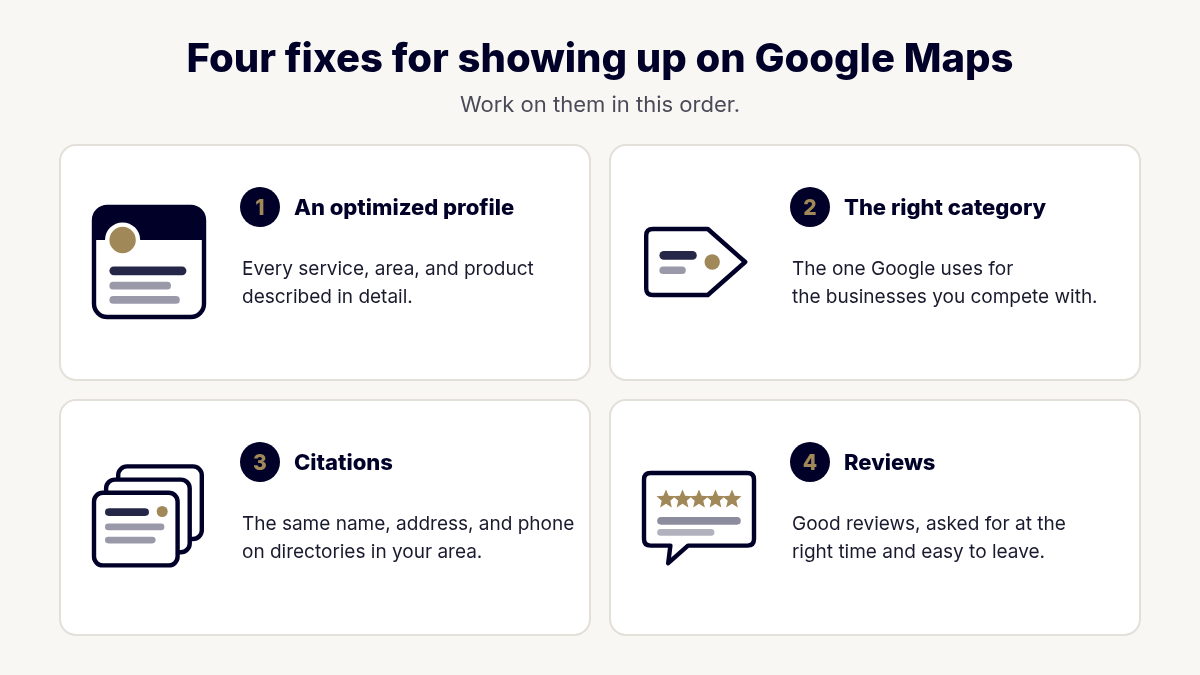
- If your business isn't showing up on Google Maps, the cause is usually one or more of four gaps: your Google Business Profile, your category, your citations, or your reviews.
- An optimized profile has keyword-rich text about every service, service area, and product you offer, with as much detail as possible.
- Choosing the category is the "Google game": pick the one Google puts you and your competitors into. One owner got a call about a week after fixing hers.
- A citation campaign adds your business to around 50 directories in your area over three months, which shows Google you're a legitimate business.
- Reviews are the part you control most: use Google's review link and QR code, ask when the customer is happiest, and mention the city or neighborhood when you reply.
On this page
- Why is my business not showing up on Google Maps?
- Reason 1: Your Google Business Profile isn't fully optimized
- Reason 2: You picked the wrong category
- Reason 3: You haven't built your citations
- Reason 4: You don't have enough good reviews
- How the four fixes work together
- A quick self-check you can do today
- What showing up on the map won't do
- Your next step
- FAQs
- About the Author
Someone in your town grabs their phone and searches for exactly what you do. Google shows a map with three businesses on it. They call one of them.
None of them is you.
You do good work. Your customers are happy. So why is my business not showing up on Google Maps? I hear that question from owners all the time. The answer usually has nothing to do with how good you are at your work. It comes down to four things Google looks for, and most owners were never told what they are.
In this post I'll walk you through all four, in the order I work on them, so you know what to fix first.
Want to know why you're missing from the map? The free Local Visibility Snapshot shows where you rank for the searches that matter, which directories have you missing or listed wrong, how your reviews compare, and what's holding your Google Business Profile back. Within 48 hours I'll send you a short personal video walking through your top three findings. Get My Free Local Visibility Snapshot
Why is my business not showing up on Google Maps?
When a business is missing from the map, I almost always find the same four gaps. Here is how I put it when we talked this through:
"First, you need an optimized Google Business profile that has keyword-rich content about all of the services that you do, the service areas that you do, the products that you provide, with as much text as possible. Second, you need to make sure you have the right category chosen. Third, you need to go through the citation building campaign. And fourth, which you have the most power, is you need good reviews showing that you do quality work and you take care of your customers."
So the four reasons are:
- Your Google Business Profile isn't fully optimized. Your Google Business Profile is the free listing that shows up in Google Maps and the map results on a Google search.
- You picked the wrong category. The category tells Google what kind of business you are.
- You haven't built your citations. Citations are listings of your business on other directories around the web.
- You don't have enough good reviews. Reviews show Google, and your next customer, that you do quality work.
Google itself says local results are based mainly on three things: relevance, distance, and prominence (Google Business Profile Help). Relevance is how well your profile matches the search. Distance is how far you are from the person searching. Prominence is how well-known your business is, and Google says that is based partly on how many websites link to your business and how many reviews you have.
You can't move your shop closer to every customer. But the four fixes in this post work directly on relevance and prominence, the two you can do something about.
Why your spot on the map matters so much
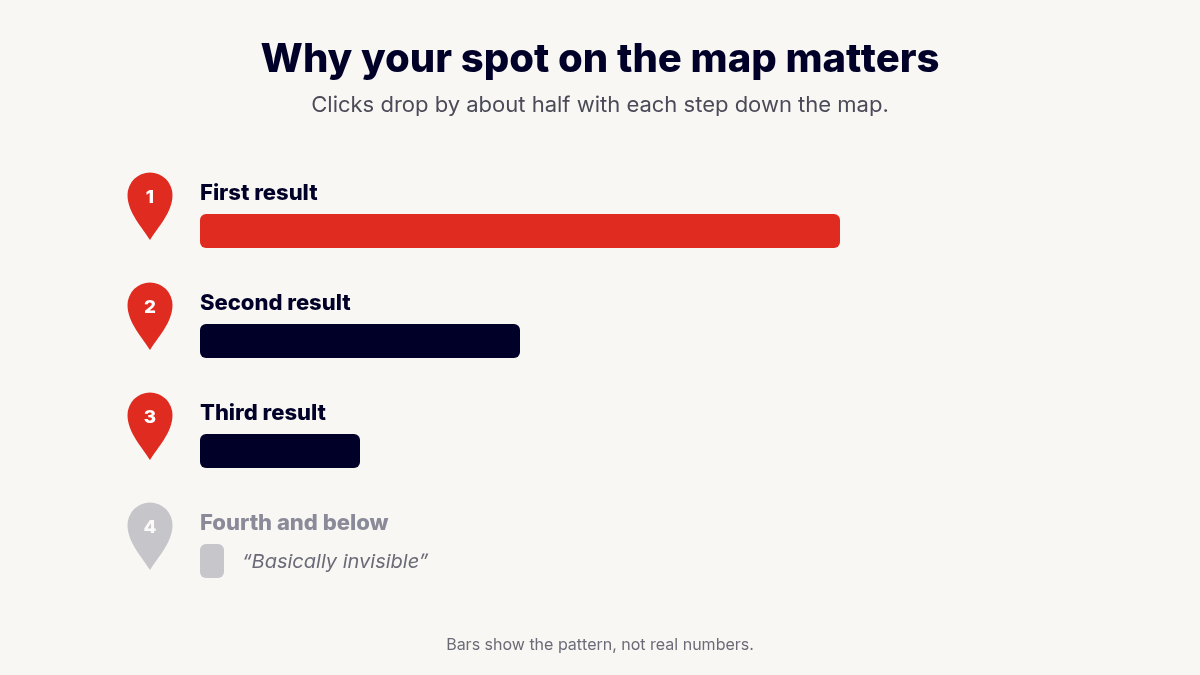
Here's what I've seen: most searchers click the first Google Business Profile, because they believe the first one is the best. That share of clicks "drops in half for the second, and then it drops in half again for the third." And if you're fourth, fifth, sixth, or on the second page, "you're basically invisible."
Each of the four fixes below gives Google another reason to move you up.
Reason 1: Your Google Business Profile isn't fully optimized
Most profiles I look at were set up once, years ago, and never touched again. The name, address, and phone are there, maybe a few photos, and that's about it. If your profile doesn't say what you do and where you do it, Google has little reason to show you when someone searches for exactly that.
What "optimized" actually means
An optimized profile is one that's complete and written with the words your customers actually use. Those words are your keywords: the phrases people type into Google when they need what you sell.
In my words, your profile needs "keyword-rich content about all of the services that you do, the service areas that you do, the products that you provide, with as much text as possible."
Here's what that looks like in practice:
- Every service, listed and described. Don't stop at your main service. If you do roof repair, roof replacement, gutters, and storm damage inspections, list each one and write a short description of each.
- Every service area. List the cities and areas you actually serve, so Google knows where to show you.
- Products, if you sell them. Give each one a name and a description.
- A business description that's clear. Say who you help, what you do, and how it makes their life better. I write these with a StoryBrand one-liner, the same short statement of the problem, your solution, and the result that leads this post.
- The details customers check. Hours, attributes, photos of your real work, and answers to common questions.
What not to do
More text does not mean stuffing keywords into your business name. Google's guidelines say your name should match your real-world name, the one on your signs and your website (Google's guidelines for representing your business). Put the keywords in your services, products, and description instead.
If you haven't verified your profile yet, start there. Here's my walkthrough on how to get your Google Business Profile verified.
Reason 2: You picked the wrong category
This is the fix I see make the fastest difference. When you set up a Google Business Profile, Google asks you to choose a primary category from its own list. Google's list is limited, so most owners pick the one that sounds right to them and move on.
But the one that sounds right often isn't the one that gets you found.
The Google game
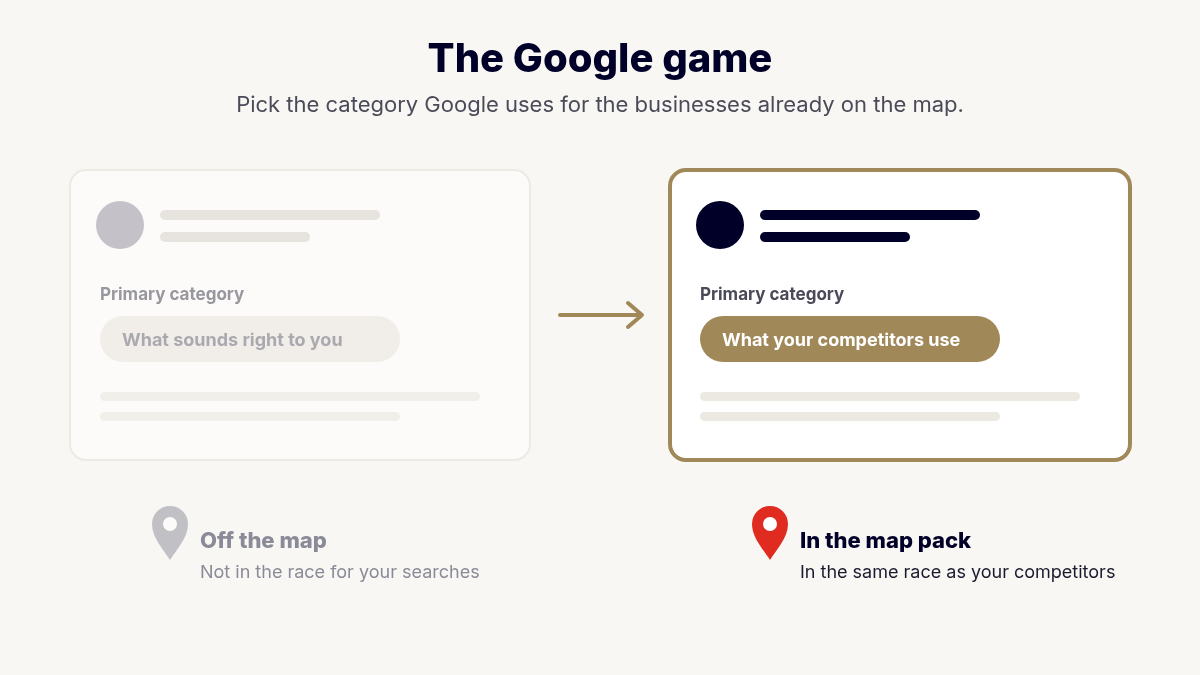
I call choosing a category "the Google game." The best category may not feel like a perfect fit for how you describe your business. But the right category is the one Google puts you and your competitors into, and the one that will get the most traffic.
So I don't guess. I look at the businesses that already show up at the top of the map for the searches you want, and I see which categories they use. Then we choose the category that puts you in the same race as the businesses you compete with.
Google's own guidelines point the same direction: use as few categories as possible to describe your core business, and choose ones that are specific but representative of your main business (Google's guidelines). The goal isn't to collect categories. The goal is to pick the right primary one.
One owner's result about a week later
One owner I worked with had her profile set up, but she was invisible on the map. I found the problem during the research I do whenever I take on local SEO work: she had picked a category that sounded right to her, but that category wasn't the right one. About a week after the category was fixed, she told me someone had contacted her after finding her on Google Business. As I described it: "That solely came because she had the wrong category selected. She picked what sounded right to her, but ... it absolutely was not the right category."
I want to be careful here. Not every category change brings a call within a week. Sometimes the category is already right, and the gap is somewhere else. But when the category is wrong, fixing the category is one of the quickest and cheapest changes you can make.
That same category research is now part of the Total Online Presence Snapshot. Page 4 of the report grades your Google Business Profile and your spot in the map results, so a wrong category is one of the things I look for. You don't have to sign up for a full local SEO project to find out whether your category is holding you back.
Reason 3: You haven't built your citations
A citation is any listing of your business name, address, and phone number on another website. Think of online directories such as Yelp, Bing Places, industry directories, and local business directories.
Why would a directory you've never visited matter? Google looks around the web to confirm that you're real. When many trusted directories show the same business, at the same address, with the same phone number, Google gains confidence that you're legitimate and established.
What a citation building campaign involves
Here's how I described the process:
"Once the Google Business profile is fully optimized and all the content is there, then we do a search for the best directories in your location area, and then we start adding all of that content information to those directories. The goal is to get around 50 directories by the time we finish the three-month campaign, and what this does is it shows to Google that you're a legit business, it gives you more authority, and it's basically gives you a good foundational profile that Google looks for when trying to find the best businesses to rank."
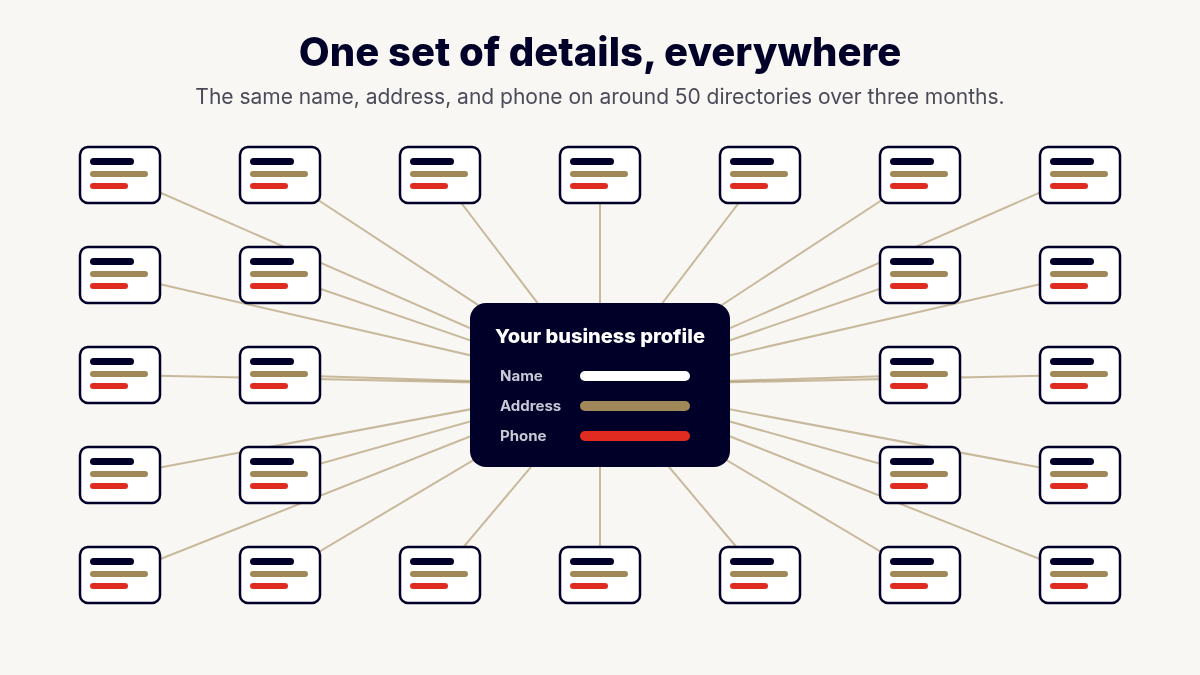
A few things stand out in that process:
- The profile comes first. We build citations after the Google Business Profile is complete, so every directory gets the same full, accurate information.
- The directories are chosen for your area. The best directories for a business in one city aren't always the best for another.
- The target is around 50 directories. That's built over a three-month campaign, not overnight.
In my experience, the biggest ranking gains come from a fully optimized Google Business Profile combined with consistent citations. That's why I handle them in that order.
Consistency matters as much as count
Citations only help if they agree with each other. Inconsistent data is one of the most common problems I see. Two addresses, an old phone number, or a slightly different business name across the internet tell two different stories about your business. That can lower your authority, especially in the eyes of AI search tools, which check your record across the web before they recommend you. Part of a good citation campaign is cleaning up the listings you already have, not only adding new ones.
Reason 4: You don't have enough good reviews
Of the four reasons, reviews are the one you have the most power over. You can't control Google's algorithm. You can control whether you ask your happy customers to share their experience.
Reviews do two jobs at once. Google says more reviews and positive ratings can help your local ranking (Google Business Profile Help). And your next customer reads them before deciding whether to call you. Good reviews show that "you do quality work and you take care of your customers."
Where you start depends on where you are
There's no one-size-fits-all review plan. As I put it: "If they haven't started getting reviews, we can help them with that process. If they have gotten reviews, we can help them refine their process. It really depends on where they're starting from."
Make leaving a review easy
The easier you make leaving a review, the more reviews you'll get. Google gives every business a short link and a QR code that take customers straight to your review page (Google Business Profile Help).
Here's how we've used that: "Google provides a QR code and a link that will link them directly to their Google review page. So, in the past, we have done business cards with a QR code that they can leave with the customer, and then also it's just coaching them on how to ask for the review."
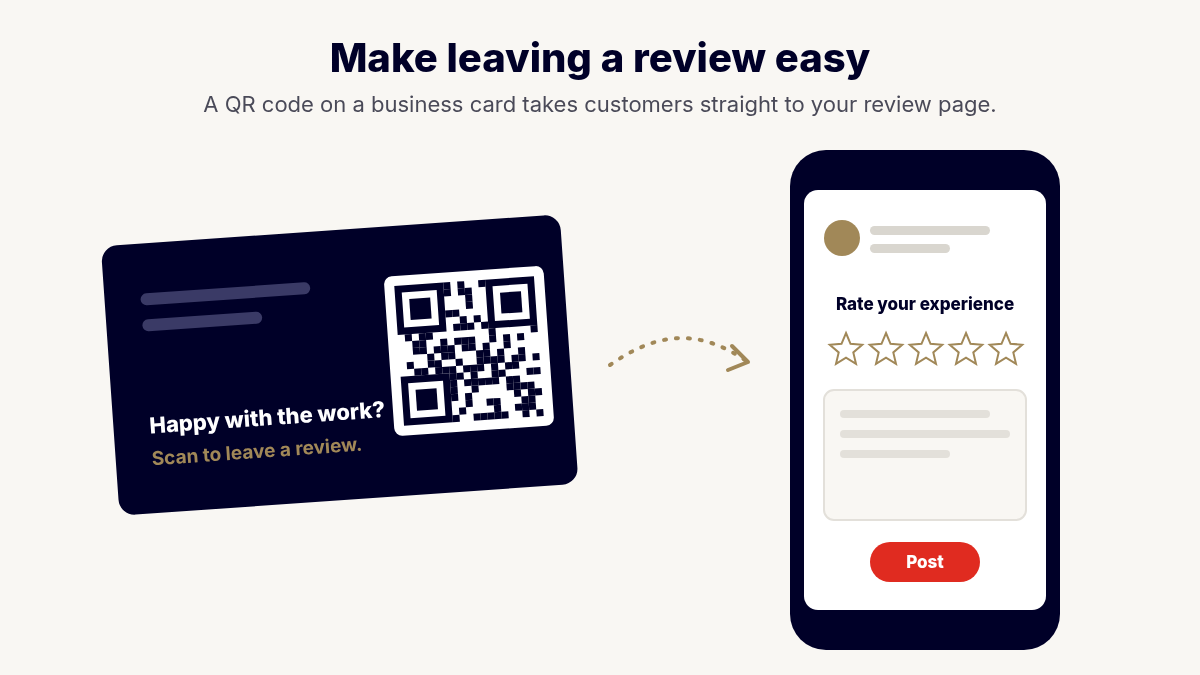
A few simple ways to put the link and QR code to work:
- Print the QR code on a business card your crew leaves with the customer when the job is done.
- Text or email the review link the same day you finish the job.
- Add the link to your invoice or your thank-you email.
Ask when your customer is happiest
Timing matters. Here's what I tell clients: "The best time to ask for a review is when the customer is the happiest, so if you've completed a job and they're satisfied, that would be the best time."
And don't be shy about asking. As I put it: "I found people will do what you ask them." Keep the ask simple and friendly. Something like, "If you're happy with the work, I'd really appreciate a review on Google."
Ask every customer as part of finishing every job, so asking becomes a habit instead of something you remember once in a while. Don't ask for a certain star rating or tell people what to write. Google's rules say businesses shouldn't ask only for positive reviews or request specific content in a review (Google Maps content policy). An honest review from a happy customer does the job on its own.
One rule to keep in mind: Google does not allow businesses to offer anything in exchange for a review, such as a discount, a gift, or a free service (Google Business Profile Help). Don't pay for reviews, and don't reward them. Just ask, and make leaving one easy.
Use your replies to mention where you work
Your reviews keep working for you after they're posted. When you reply to a review, you have a chance to add details that help Google connect your business to the places you serve.
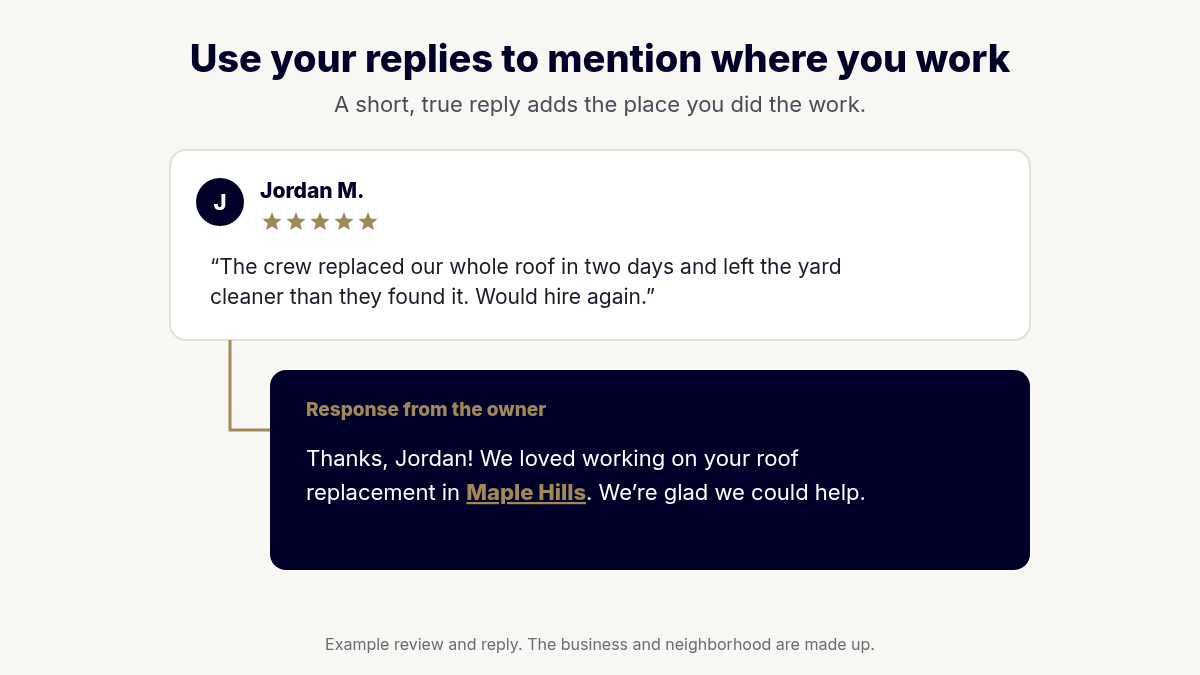
As I put it: "When they respond to the review, that's where they can mention the, the city, the location, the neighborhoods, and that brings the location specific information and points about the review."
So instead of a reply that says only "Thanks!", thank the customer by name and mention the work and the place. Something like, "Thanks for trusting us with your roof replacement in [neighborhood]. We're glad we could help." Keep it natural and true to the job. Replying also shows future customers that you pay attention, and Google says helpful replies can show that you're responsive (Google Business Profile Help).
How the four fixes work together
The four fixes build on each other, and the order matters.
- Optimize the Google Business Profile first. Everything else points back to the profile.
- Get the category right, usually at the same time as the profile.
- Build citations next, sending the same accurate information to around 50 directories over three months.
- Build reviews all along the way. Start asking now, and keep asking.
A profile can be fixed in a couple of weeks. Trust takes longer. Citations have to be built, reviews come in one customer at a time, and Google needs to see your profile stay active over weeks and months. That's why I run the full foundation over three months instead of promising quick results.
On our public local SEO page, you can see what this looks like when the pieces come together. A custom window coverings company in Portland, Oregon, wasn't showing up in Portland at all. After we fixed technical problems on their website and fully optimized their profile, 23 of their 25 targeted keywords ranked in the Local 3-Pack, the top three map results. I share that as one example, not a promise. Every market is different.
Not every business needs every fix
Not every business needs all four. Some owners already have a strong profile and great reviews, and the only gap is the category. Others have the right category and hundreds of reviews, but no citations. That's why I start by looking at where you are, instead of selling the same package to everyone.
A quick self-check you can do today
Open your Google Business Profile and ask yourself these questions:
- Is my profile complete? Are all my services listed, each with a description? Are my service areas listed? Are my products listed, if I sell them?
- Does my description say what I do, where I do it, and how I help? Would a stranger understand the description in a few seconds?
- Does my primary category match the businesses at the top of the map? Search for your main service in your town and look at the top three results. Do their categories match yours?
- Is my business name, address, and phone number the same everywhere? Search your business name and check a few directories that come up.
- Do I have a simple way to ask for reviews? Do I have my review link and QR code, and does my team ask at the end of every job?
- Do I reply to my reviews? And when I do, do I mention the work and the area?
If you answered no to any of these, you've found a good place to start.
What showing up on the map won't do
- No one can guarantee rankings. Google decides who shows up. Be careful with anyone who promises a specific spot.
- Distance still counts. Google weighs how close you are to the person searching. You may rank well near your office and lower across town, and that's normal.
- Your market sets the ceiling. Showing up on the map gets you in front of the people who are already searching. Map visibility can't create searches that don't exist. If you're wondering how much traffic to expect, read How Much Traffic Should My Website Get?, where I explain how I size a market as an ocean, a lake, or a pond.
- Your website still has to do its job. Many people click through to your website before they call. A confusing website can lose them there.
Your next step
You don't have to guess which of the four reasons is holding you back. Here's the path I offer, one step at a time:
- Free Local Visibility Snapshot. See where you rank, which directories have you missing or listed wrong, how your reviews compare, and what's holding your profile back, plus a short personal video from me with your top three findings.
- Total Online Presence Snapshot ($297). The same research I use to catch a wrong category, plus a look at your website and AI search, in a 6-page report with a 30-minute call with me.
- Map Pack Jumpstart ($999, 14 days). I optimize your Google Business Profile, including a primary and secondary category audit against what's ranking, map your rankings against your top competitor, and hand you a 30/60/90 roadmap.
- The Authority Foundation (90 days). The three-month build of 50+ citations, a review system, and steady profile updates that gets Google to trust you. Your Jumpstart fee is credited toward it if you start within 30 days.
Find out why you're not showing up on Google Maps. Get the free Local Visibility Snapshot and a short personal video from me with your top three fixes, so you know exactly what to work on first. Get My Free Local Visibility Snapshot
Want my eyes on your category, too? Get the Total Online Presence Snapshot ($297). Rather talk it through? Book a free call and we'll look at your map together.
FAQs
Why is my business not showing up on Google Maps?
The most common reasons are a Google Business Profile that isn't fully optimized, the wrong primary category, too few citations on other directories, and not enough good reviews. In my experience, fixing those four things in order gives Google the information and trust it needs to show your business.
How do I choose the right Google Business Profile category?
Choose the primary category Google uses for the businesses that already rank at the top of the map for your main service. The right category may not feel like a perfect description of your business, but it puts you in the same race as your competitors, and changing to the right one can make a quick difference.
What is a citation, and how many do I need?
A citation is a listing of your business name, address, and phone number on another website, such as an online directory. In my citation campaigns, the goal is around 50 directories chosen for your area over three months, all with the same accurate information as your Google Business Profile.
How long does it take to show up on Google Maps?
There's no single answer; some fixes can work quickly, and others take months. I've seen an owner get a call about a week after fixing the wrong category, but building citations and reviews takes longer, which is why the full foundation runs over three months.
How do I get more Google reviews?
Make it easy and ask at the right time. Use the review link and QR code Google provides, leave a business card with the QR code when the job is done, and ask when the customer is happiest, right after a job they're satisfied with. Never offer anything in exchange for a review.
Should I reply to my Google reviews?
Yes; replying shows customers you pay attention, and your reply is a natural place to mention the city or neighborhood where you did the work. That adds location-specific information to the review.
Does my position on Google Maps really matter?
Yes, a lot. In my experience, most searchers click the first Google Business Profile, about half as many click the second, and about half again click the third. Below the top three, a business is close to invisible.
About the Author
Tim Yates is the founder of StoryWorks Marketing in Waukee, Iowa, in the Des Moines area. He has been a Certified StoryBrand Guide since 2020, and he is a StoryBrand Certified Coach and a Duct Tape Marketing Certified Fractional CMO. He has served as a StoryBrand Guide and Coach on 20+ StoryBrand livestreams alongside Donald Miller, J.J. Peterson and April Sunshine Hawkins, and he has coached 102 businesses through the StoryBrand framework since 2020. He helps owner-led businesses clarify their message and get found on Google, on the map, and in AI search.
Google's rules and tools keep changing. When something on this page stops being true, I will update the page.
Verification: StoryBrand directory · Duct Tape Marketing consultant profile
Related reading: How Much Traffic Should My Website Get? · Local SEO Services · How to Get Your Google Business Profile Verified