
LOcal SEO / Google Business Profile
How to Get Your Google Business Profile Verified in 2026 (And Actually Get Found)
Verification proves you're real to Google. Being found proves you're real to customers. Here's how to do both.
[ Visual placeholder ]
Side-by-side: an AI answer that skips you today vs. one that names your business after the review.

TL;DR
Verification proves to Google that you're a real business — and since 2020, Google increasingly wants that proof in the form of a video, not a postcard code.
Most verification videos are rejected for one of five reasons: no recognizable location marker, no proof you can access the space, no verifiable documents, no "cash register," or no signage. Nail those five and you dramatically improve your odds.
A PO box is the fastest way to get flagged. Google wants to see a real person, at a real office, running a real business that helps real customers.
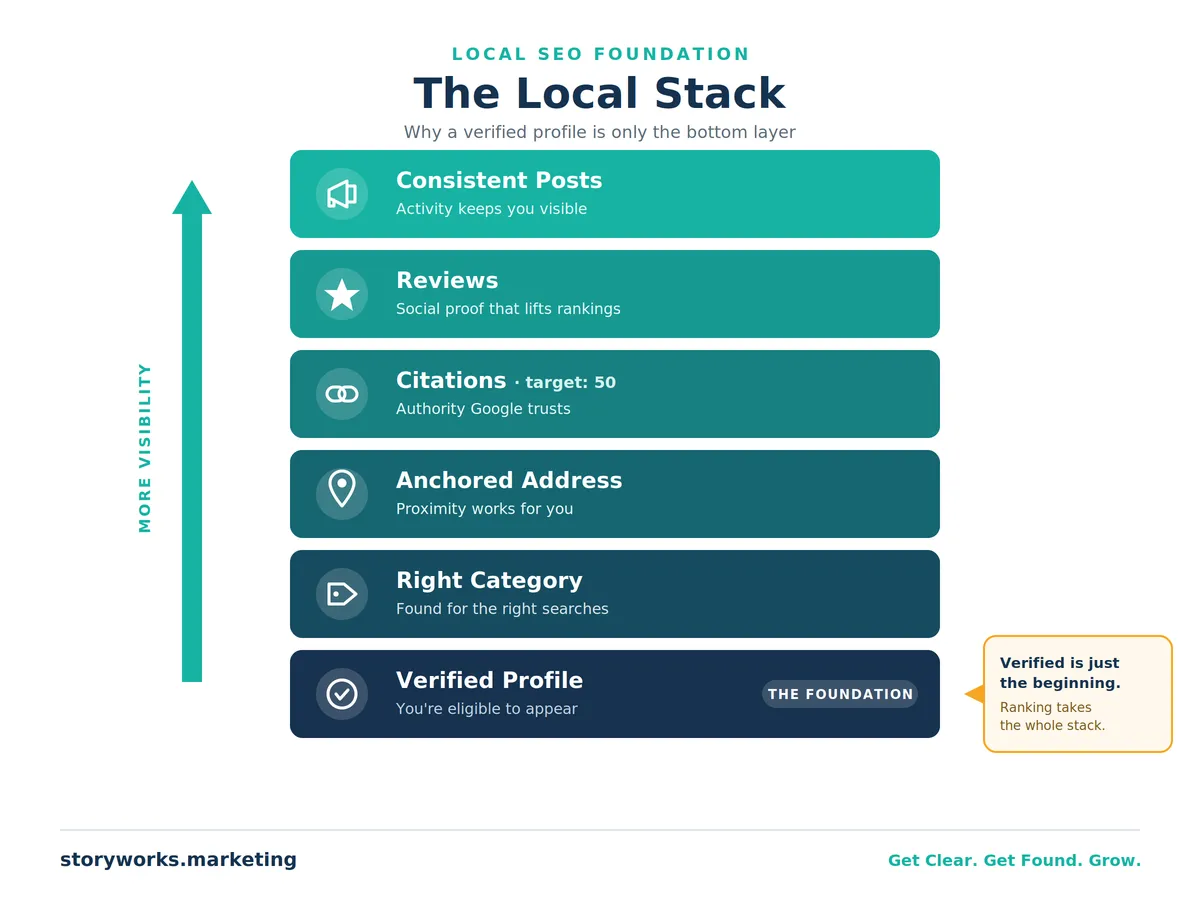
Getting verified is the starting line, not the finish line. A verified profile can still sit on page five. Being found takes the right category, an anchored address, citations, reviews, and consistent activity.
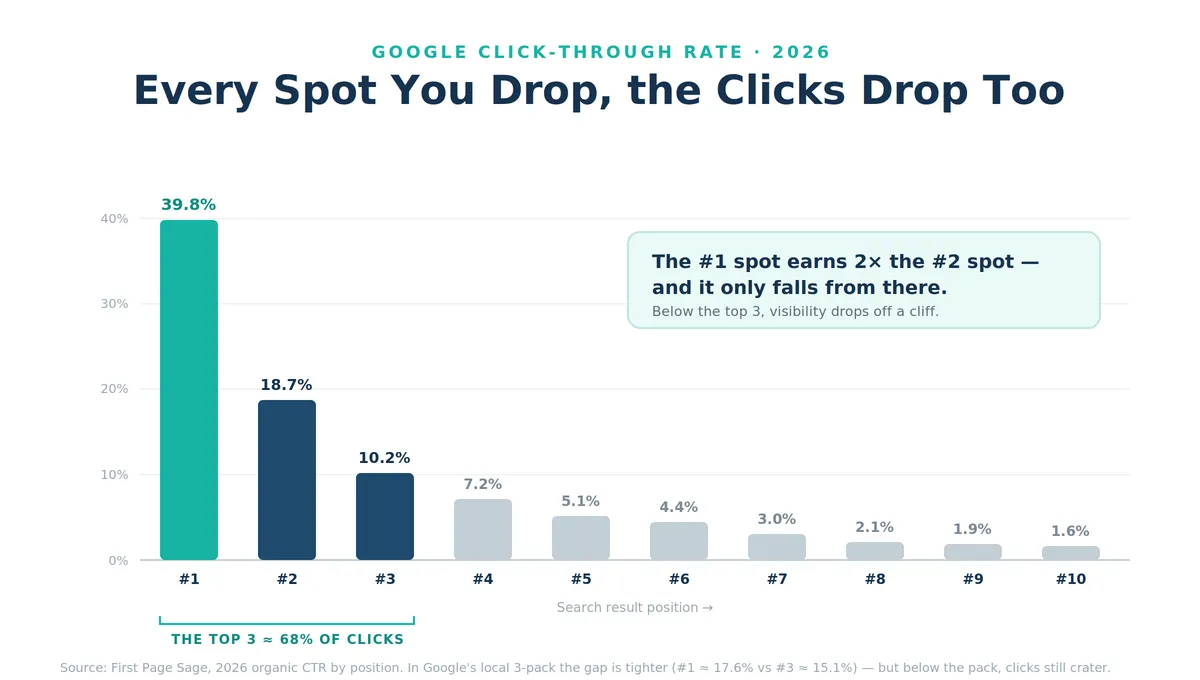
In the local pack, position is everything — the top result earns the lion's share of clicks, and it roughly halves with each spot you drop.
Table of Contents
The frustration almost every business owner hits
You did everything right. You created your Google Business Profile, filled in your hours, added your services, uploaded a few photos, and waited for the phone to ring.
And then… not much happened.
Maybe you're stuck on page five when someone searches for what you do. Maybe Google suddenly asked you to prove your business is real by recording a video — and after all that effort, you got a vague rejection notice with no clear explanation of what went wrong. Maybe your profile went dark right when you needed it most, and now customers can't find you at all.
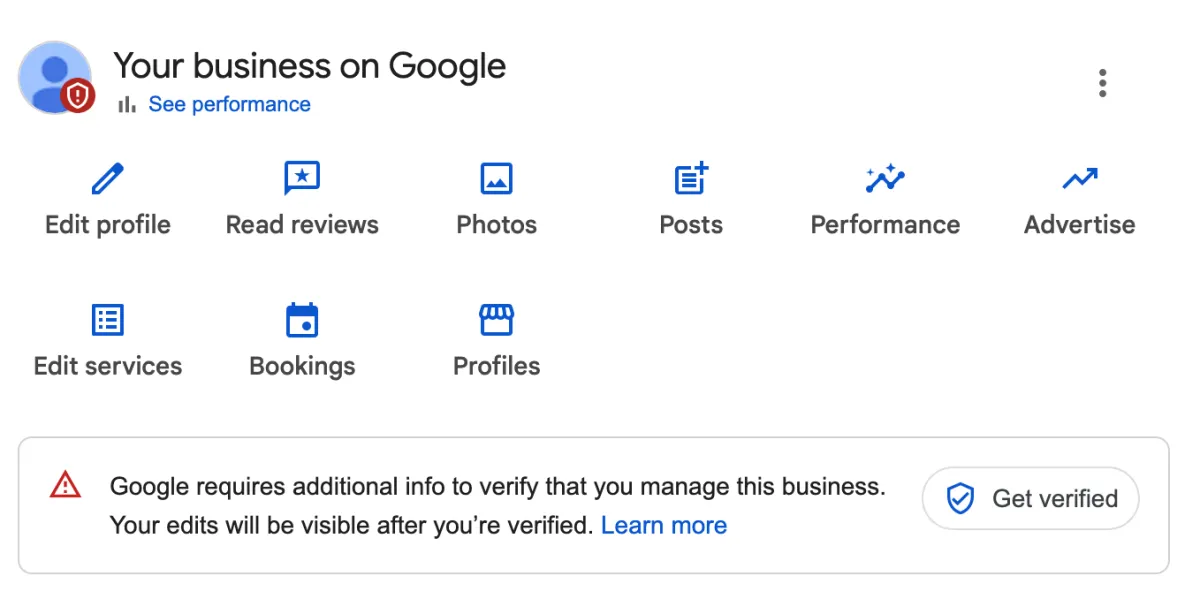
If any of that sounds familiar, take a breath. You're not doing anything wrong, and you're definitely not alone. Google has quietly made verification harder over the past few years, and the rules aren't written down anywhere obvious. The good news: after helping more than 34 businesses get verified and found since 2020, we've learned exactly what Google is looking for — and we're going to walk you through it, step by step.
Here's the one idea to hold onto as you read: verification proves you're real to Google, but being found proves you're real to customers. You need both. Getting the checkmark is only worth it if your profile is built to actually show up.

What "verified" actually means (and why Google now wants a video)
Verification is simply Google's way of confirming that your business exists, that you're the one who runs it, and that you do what you say you do. Once you're verified, you become eligible to appear in Google Search and Google Maps.
Notice the word eligible. Verification doesn't guarantee you'll rank — it just gets you in the door. More on that later.
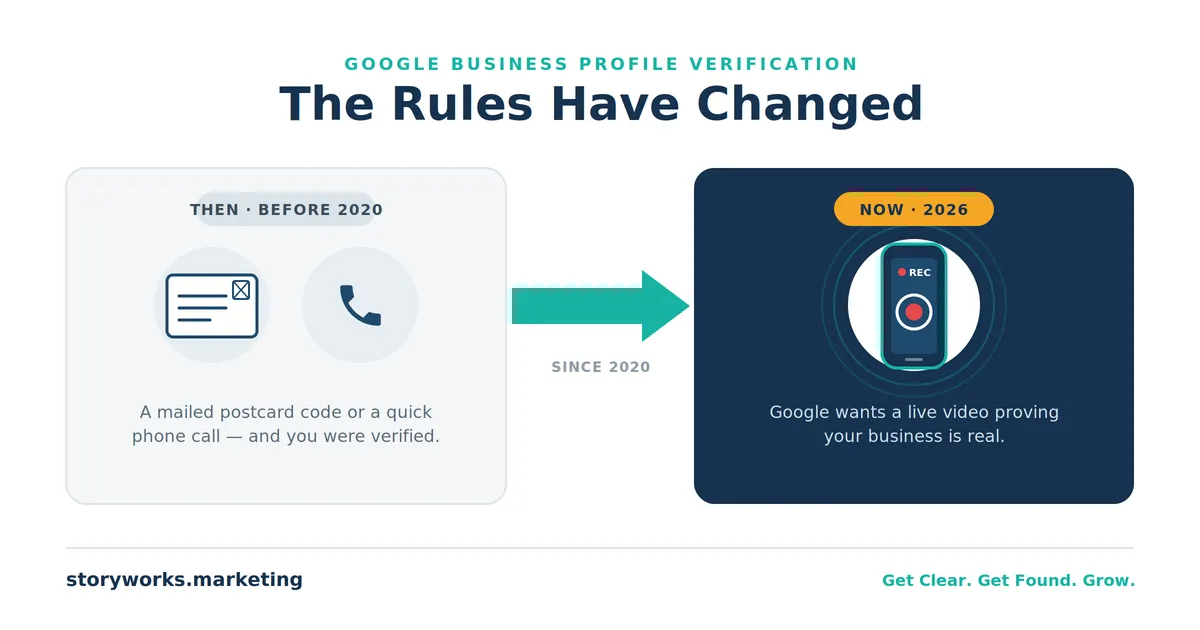
It used to be easy. When we started doing this work, Google would either call your business directly (you pick up, they know you're legitimate) or mail a postcard with a code to your address that you'd type in to verify instantly. Simple.
Then the world changed. Since 2020, the explosion of remote work and home offices — combined with a wave of fake and "fly-by-night" listings clogging up Google Maps — pushed Google to tighten the screws. Postcards and phone calls are easy to fake. A live video is not. So Google increasingly asks business owners to record a video that proves, on camera, that the business is real and that you have the authority to manage it.
As we tell our clients: Google is a bit like the Wizard of Oz, working the levers behind a curtain. Nobody outside the company knows the full algorithm. But the results Google shows are out in the open — and after enough real-world reps, the patterns become clear.
Real Results: Two Businesses That Went From Invisible to Found
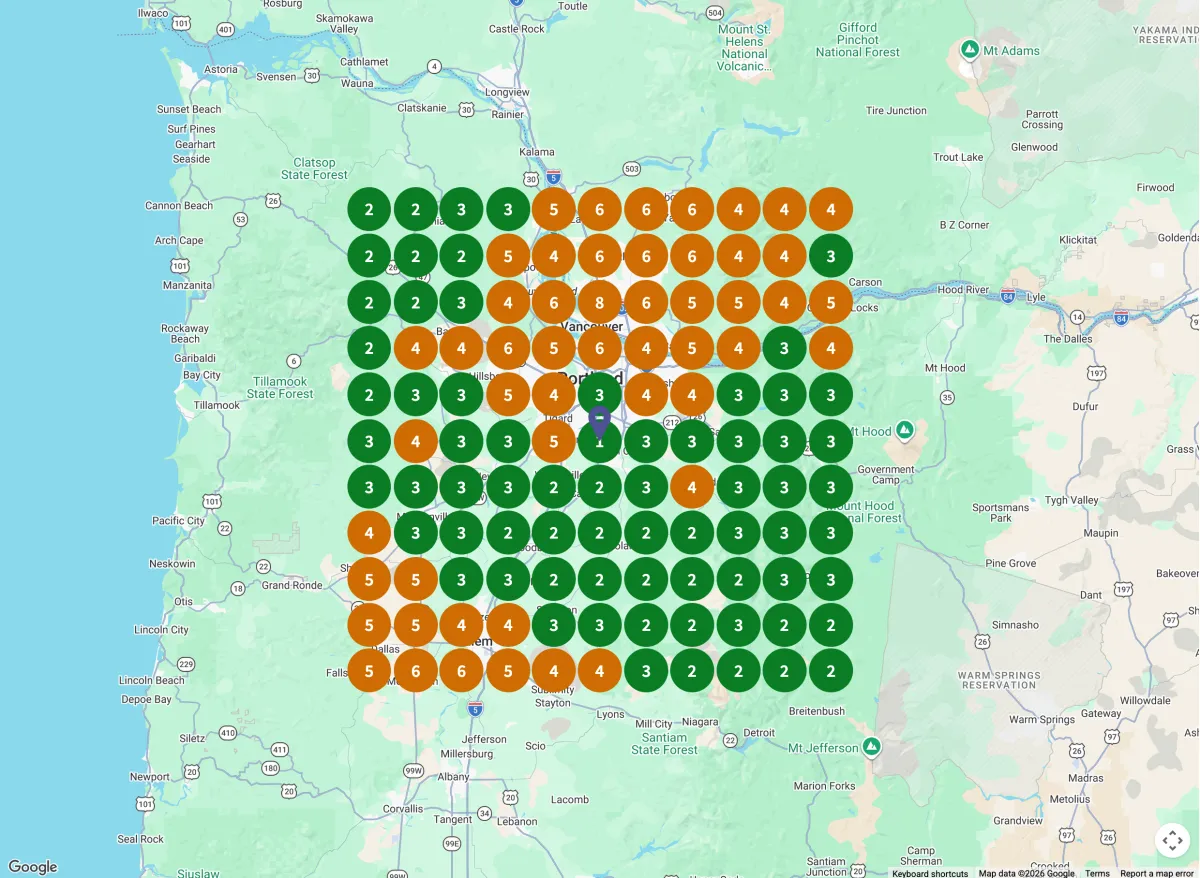
Adrette Custom Window Coverings — Portland, Oregon. When Jens and Marlys came to us, they'd already spent thousands on SEO and were getting thousands of website visitors. The problem? Almost none of that traffic was local. People were finding them from New York and all over the country — but not from their own backyard, where the actual customers are. In local search and on Google Maps, their address simply wasn't showing up, largely because they were set up as a service-area business with no anchored address (and an old PO box in the mix — a major red flag to Google).
We set an anchor address to their home office. That move triggered a re-verification and a video — which took a couple of attempts to get right — but once approved, they instantly started showing up in local search. Today they perform strongly across the Portland market.
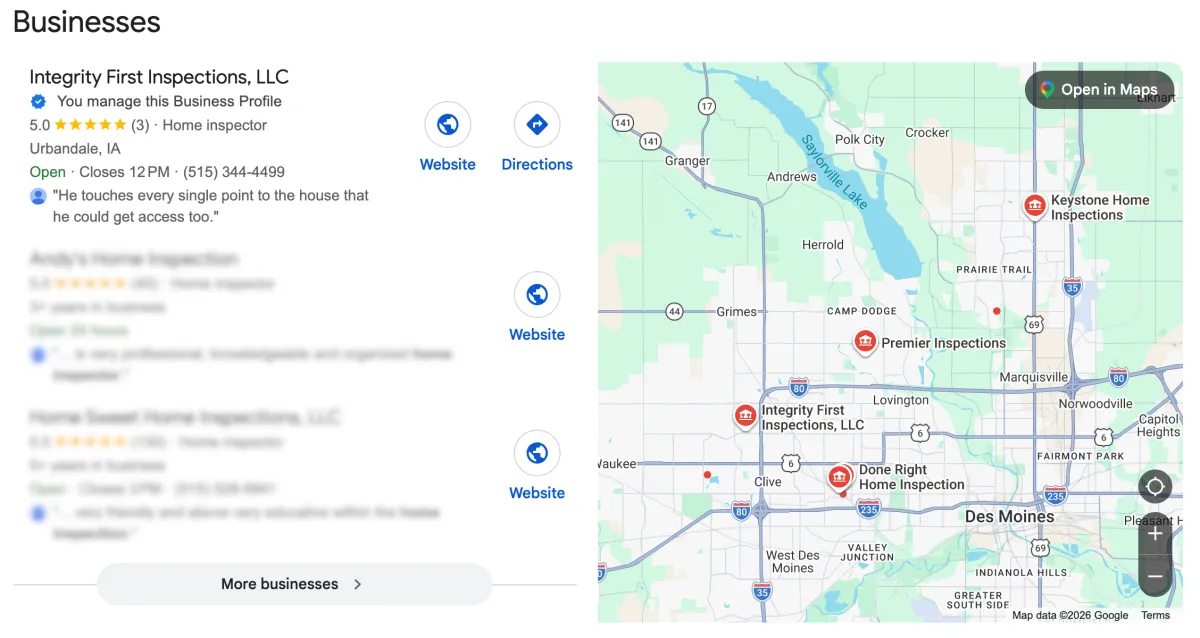
Integrity First Home Inspections — Urbandale, Iowa. When Bob reached out in March, he didn't even have a Google Business Profile yet. We built it from scratch, walked it through verification, optimized it, tuned his website, and did the keyword research. By the end of our three-month engagement, Bob's profile sat in the number one spot in Urbandale for his services. From nothing to first place in short order.
Two very different starting points, one common thread: getting verified was the gateway, but the strategy behind it is what produced the leads.
#1
Integrity First Home Inspections — went from having no GMB profile to now sitting in the top spot for Urbandale, IA in just 3 months.
Found
Adrette Custom Window Coverings — from national noise to Portland, Or. local visibility.
What triggers a video verification in the first place
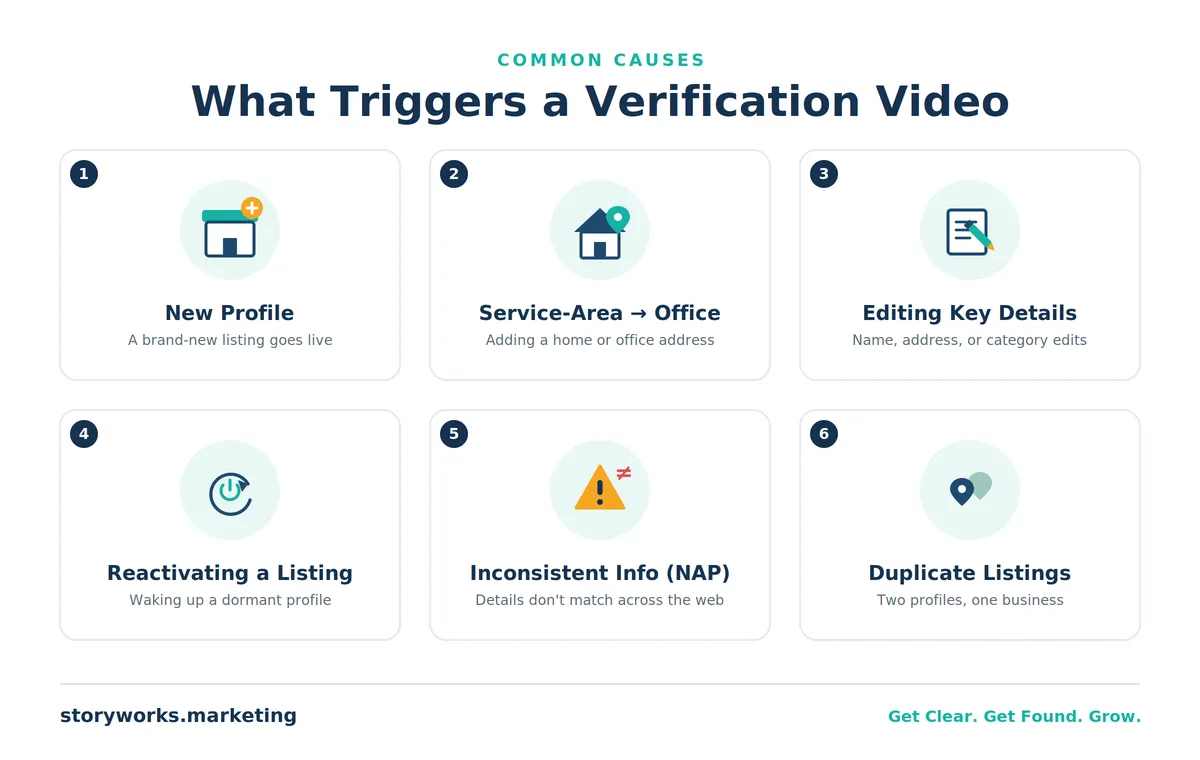
Let's be honest about something most guides won't admit: nobody outside Google knows the exact triggers with certainty. But across dozens of profiles, a few patterns show up again and again:
Starting a brand-new profile, especially in categories prone to spam.
Switching from a service-area business to a physical or home-office address. This is one of the most reliable triggers we see. The moment you plant that anchor, Google often wants a video.
Editing key details like your business name, address, or category after going live.
Reactivating a dormant or previously flagged profile.
Inconsistent information across your website, Yelp, Facebook, and official documents (what SEOs call NAP — Name, Address, Phone — consistency).
Anything that looks "off," even innocently. One of our clients was fully approved, then got re-flagged simply because he posted a close-up photo of his branded work truck. Google's algorithm caught something it wanted to double-check. We appealed, showed nothing in the image conflicted with the profile, and Google reinstated it.
The takeaway: a re-verification request doesn't mean you did something wrong, and it's not the time to panic and start deleting things. It's a checkpoint. Clear it calmly and you're fine.
Why your address matters more than you think
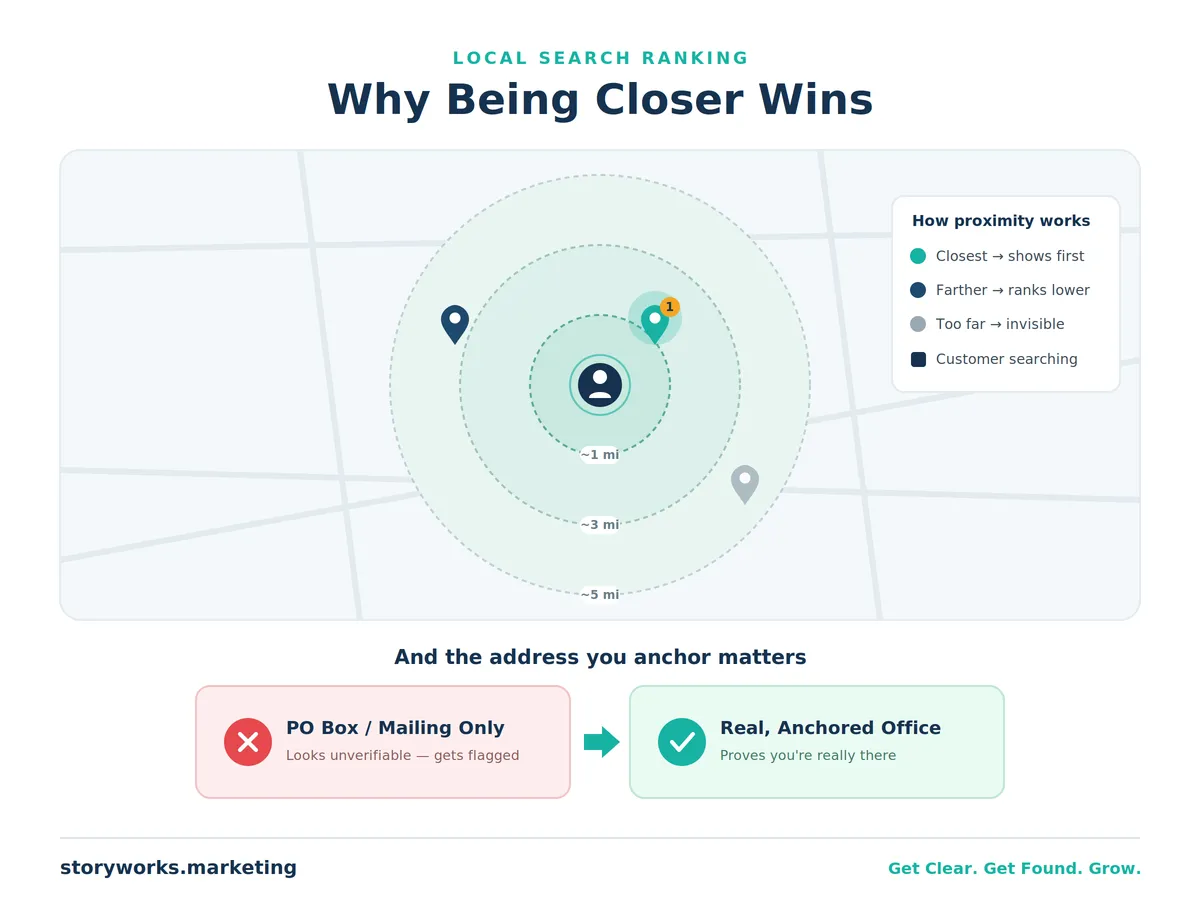
Here's a distinction that trips up a lot of owners: a service-area business hides its address and lists the areas it serves, while an address-based business anchors to a real location.
Why does the anchor matter so much? Because the very first thing Google weighs for local ranking is proximity — how close your business is to the person searching. Picture the Chicago metro: it sprawls across parts of Illinois, Indiana, and Wisconsin. You could technically "serve Chicago" while sitting two hours from the person doing the search. Without an anchor, that distance quietly works against you.
There's a second reality worth naming. For pure service-area businesses, Google increasingly nudges you toward paying for visibility through Local Service Ads (LSAs). To compete that way in a competitive market, you often need a budget in the range of $6,000–$15,000 per month. That math works for some businesses. But most of the owners we work with would rather make a one-time investment in organic visibility — a platform they build once that keeps returning customers month after month, like any good investment.
So what if you genuinely work from home or don't have a public storefront? Good news: since 2020, home offices are completely normal — most of our clients run from one. You can anchor to your home office and hide the address from public view if you prefer. Just avoid the trap that sinks so many owners: a PO box, or a mailing address that's separate from where you actually work. It makes you look shady to Google's system — even though you're not — and that mismatch is a common cause of flags. Anchor to where you truly work, and keep that address consistent everywhere Google looks.
One quick note on categories: which category you choose is its own high-stakes decision — the "Google Game" — because it determines the searches you're even eligible to appear for. We cover it in depth in its own guide, but keep it on your radar: the category that describes you best isn't always the one that gets you found.
How to film a verification video that passes
This is where most owners get stuck — so let's make it simple. Google won't let you record a clip and upload it later. You'll record live, inside Google's own system, through your phone's camera. One continuous, unedited take, at least 30 seconds, no faces, no sensitive financial details on screen. You don't even need to narrate — reviewers often watch with the sound off.
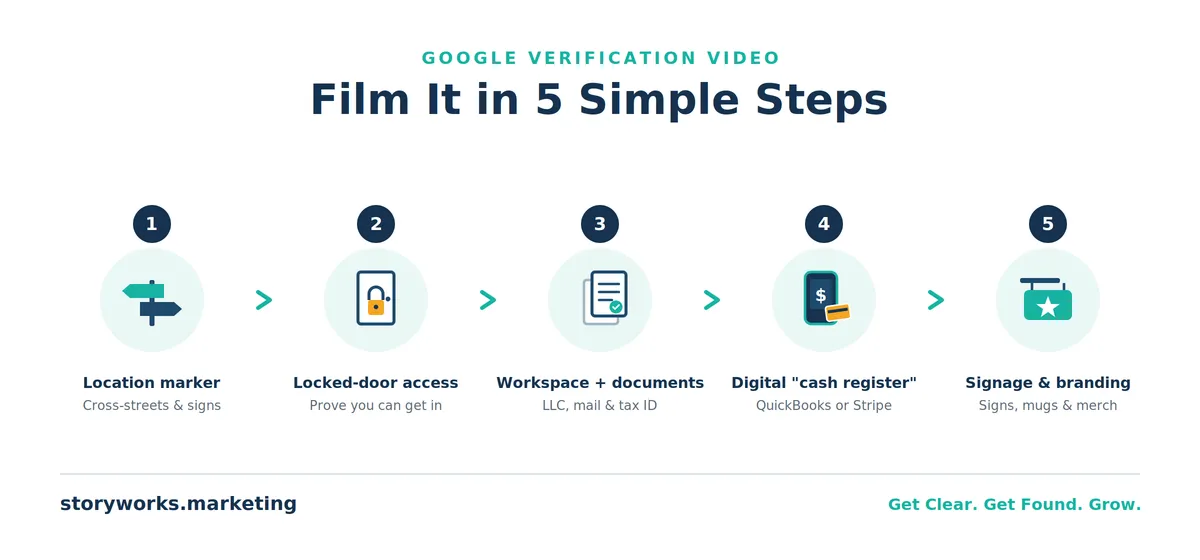
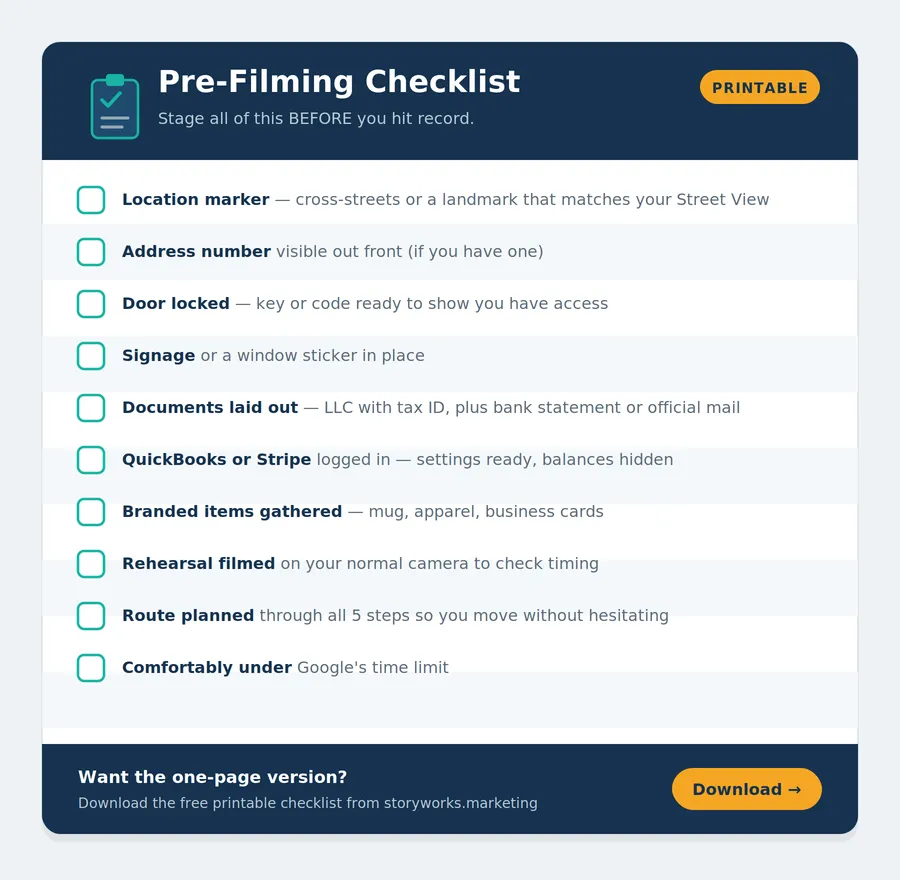
You can absolutely rehearse with your own phone camera first to check your timing and flow. When you're ready, here's the sequence we coach every client through:
1. Establish the location is real. Start outside with a recognizable marker — cross streets, a street sign, or a landmark. Google already has a Street View image of your building, so point to what matches it: "Here's the corner, here's what you see on the map." One clever workaround from a client: her spouse filmed the cross-street signs, then drove her straight to the office in one continuous shot to establish the connection quickly.
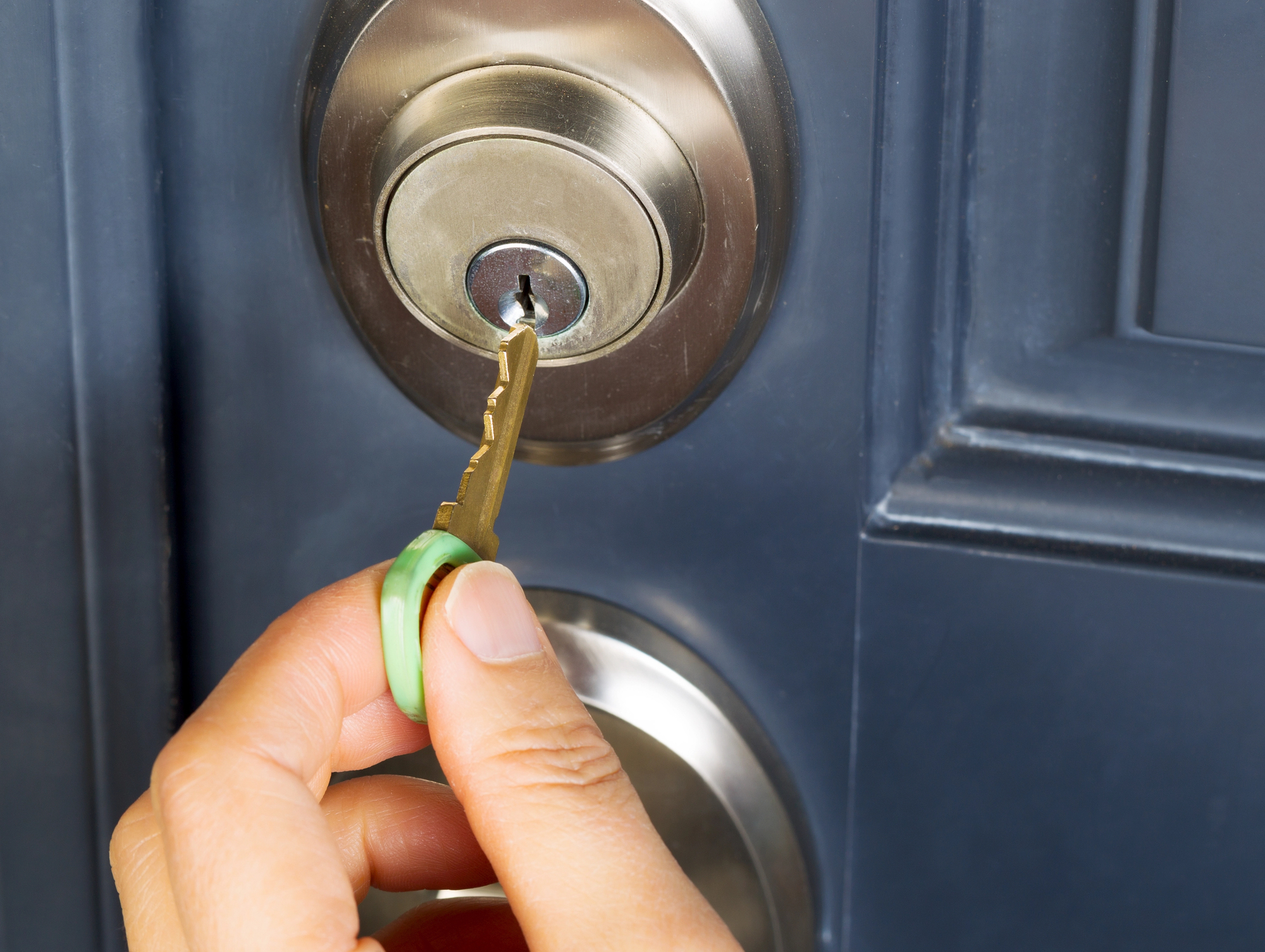
2. Prove you can get in. This is critical and it's a common failure point. The door needs to be locked. Walking through an already-open door isn't enough. Jiggle the handle to show it's locked, then unlock it with your key or key code and walk in. If you have a sign or even a window sticker marking your office, show it.
3. Show your workspace and documents. Walk to your actual office — no need to dawdle. Then show documents (prepared in advance) that tie your business to the address: your LLC filing with the tax ID, a bank statement showing the office address, or anything with your company name and address on it. A company-vehicle statement mailed to your business works too.
4. Show your "cash register." Google wants to see how you handle money. A home office doesn't have a literal register — so show your financial software instead. Log in to QuickBooks or Stripe on camera, go straight to the settings, and reveal that the account is set up under your business name, address, and tax ID. That satisfies the requirement cleanly.
5. Show signage and branded proof. Display any signage in your office (if you don't have one, it's worth having a small sign made just for this) and any branded merchandise — from a coffee mug to a koozie. It all reinforces that you're a legitimate operation.
One more hard-won tip: keep it tight. We once filmed a beautiful, thorough video only to hit "too long" at the very end and have to start over. Plan each beat before you record, move with purpose, and stay comfortably under Google's time limit.
Resource: Read the actual guidelines for video approval from Google.
Additional Resource: How To Film A Google Business Profile Video That Passes The First Time
What to do when your video gets rejected
First, don't take it personally. We've had clients — and honestly, ourselves — go through three or even four videos before approval. Google is being deliberately strict because it's trying to keep fake businesses off the map. Multiple attempts are normal.
When a video fails, Google sends back generic feedback. The trick is to reverse-engineer it: look at what you submitted and figure out which of the five essentials was weak. Almost every rejection traces back to one of them:
No recognizable location marker up front
No proof you can access the space (the locked-door test)
No verifiable mail or documents
No "cash register" (QuickBooks/Stripe)
No signage or branded proof
If your upload keeps failing, check your internet connection first, then your video length — an over-length recording is the most common technical culprit. Trim your plan and re-record shorter.
And a note on patience: Google says reviews take up to five business days, and often that's accurate. But we've seen cases drag on for weeks or even months, requiring repeated nudges. There's no fixed timeline — you simply keep at it until you're approved. While you wait, resist the urge to edit your profile or change your address again. That only muddies the water.
The truth nobody tells you: verified isn't the finish line
Here's the part that changes everything.
Getting verified means you can be shown. It does not mean you'll be shown well. Your profile could land on page one — or page six. Being visible and ranking is a second job entirely.
Consider this: roughly 97% of all websites get zero organic traffic. Every one of those businesses completed step one — they built the site, they got online — but something is stopping them from actually being found. The same is true for Google Business Profiles. Simply having one is not enough.
And position matters enormously. In the local "map pack" — the top three businesses Google shows for a search — the number one spot captures the bulk of the clicks, because people instinctively trust the top result. From there it drops fast: second place earns roughly half of first, third roughly half again, and by the time you're on page two, you're all but invisible. Independent 2026 click-through data backs this up: the top local result earns around 17–18% of clicks, and broader organic results fall from about 40% at position one to under 2% by position ten.
Every spot you drop, the eyes drop with you. That's why the businesses that win locally don't just get verified — they build the full foundation underneath their profile.
How StoryWorks turns a verified profile into leads
Think of your Google Business Profile as the cornerstone of your entire online presence. Nearly every other platform — Bing, Yahoo, and dozens of directories — pulls its data straight from it. In some ways it's even more important than your website. (Though your website matters just as much, because you own it and Google owns your profile — the two have to work in unison.)
Here's the foundation we build for our clients over a focused three-month engagement:
We start with your message. As StoryBrand Certified Guides, we build your BrandScript first — clarifying who your ideal customer is, the problem they're trying to solve, and how you guide them to a win. Clarity is the secret sauce behind everything that follows.
We do the keyword research to learn exactly what your ideal customers type when they're looking for someone like you — so they find you by the problem you solve, not just your name.
We reverse-engineer the winners already ranking for those keywords, then optimize your profile and website to match — including the right primary and supporting categories.
We anchor your address and secure verification, so your cornerstone is solid.
We build authority through citations — getting your business consistently listed across high-, medium-, and low-authority directories, with a target of around 50 citations. Google reads that as legitimacy, and it's often the difference between showing up and staying invisible.
We help you earn reviews — the one ranking factor you control most — and keep your profile active with regular, keyword-rich posts.
That's how Bob went from no profile at all to the top spot in Urbandale. It's how Adrette Custom went from national noise to local dominance. And it's why the profile for one of our roofing clients in Cincinnati is now the single biggest driver of "schedule a free estimate" requests — outperforming their paid ads, social media, and organic search combined.
You've worked hard to build your business. It deserves to be found.
Ready to stop wrestling with Google? Schedule a free 30-minute discovery call. We'll talk through what you've tried, where you're stuck, and whether we're the right fit to help — and if someone else would serve you better, we'll point you their way.
Ready to stop wrestling with Google?
Frequently asked questions
How long does Google Business Profile verification take?
Google says up to five business days after you submit your video, and that's often accurate. But it can take longer — we've seen cases stretch to weeks or months, sometimes requiring follow-ups. There's no guaranteed timeline; you keep at it until you're approved.
Why does Google want a video to verify my business?
Since 2020, a surge in fake and low-quality listings pushed Google to require stronger proof than a postcard or phone code. A live, unedited video is much harder to fake, so Google uses it to confirm your location, your business, and your authority to manage it.
Can I use a PO box for my Google Business Profile?
No — and even a previously used PO box can cause problems. Google wants a real, physical location where you actually work. Remove any PO box from your website and profile, anchor to your real office (home offices are fine), and keep the address consistent everywhere.
Can I verify a Google Business Profile if I work from home?
Yes. Home offices are completely normal now and most of our clients use one. Anchor to your home address (you can hide it from public view), and film your verification video from that office. Just avoid a separate mailing address or PO box, which creates the mismatch that gets profiles flagged.
My verification video was rejected. What now?
Don't panic — multiple attempts are common. Google's feedback is usually generic, so review your video against the five essentials (location marker, locked-door access, verifiable documents, "cash register," and signage) and re-record, strengthening whichever was weak.
Does getting verified mean I'll show up on Google?
Not by itself. Verification makes you eligible to appear, but ranking well takes the right category, an anchored address, citations, reviews, and consistent activity. Many verified profiles still sit on page five because the foundation underneath them was never built.
Is a Google Business Profile really free?
The account is free to create, but treating "free and set up" as "done" is the biggest mistake owners make. Your profile needs optimization, the right category, and ongoing keyword-rich activity to actually get found.
Additional Resources:
Sterling Sky Video Verification - https://www.sterlingsky.ca/google-business-profile-video-verification/
First Page Sage - https://firstpagesage.com/reports/google-click-through-rates-ctrs-by-ranking-position/

Tim Yates is the founder of StoryWorks Website Design & Marketing and a certified StoryBrand Guide. He's been building websites since 2010 and, for the past eight years, has specialized in the local SEO and Google Business Profile work that turns "invisible" businesses into the ones customers actually find.
Since 2020, Tim has personally managed and optimized more than 34 Google Business Profiles — coaching business owners through video verification, reinstatements, and the full climb into Google's local 3-pack. His clients have gone from no profile at all to the #1 spot in their market in as little as three months, and the websites StoryWorks builds rank in the top 1% of the internet for organic traffic.
Grounded in the StoryBrand framework and connected to the Duct Tape Marketing network of certified marketers, Tim's mission is simple: help hardworking business owners get clear, get found, and grow. He believes if your customers can't find you, they can't hire you — and he'll point you toward the right help whether that's StoryWorks or not.

THE PROOF
From Skipped Over to Recommended.
The fastest way to feel this: ask AI a question your customers ask, and see
whether your name comes up.
BEFORE
[ Placeholder — drop in a real screenshot of an AI answer where the business is absent. ]
AFTER
[ Placeholder — the same query, now naming the client's business as the recommended answer. ]
WHAT CLIENTS SAY
"[ Placeholder — add a real client quote about being found in AI search or the clarity of the roadmap. ]"
[ Client Name ] - [ Title, Company ]